创建项目
JMVN
!!! tip jmvn init 快到你无法想象,丝滑的感觉 !!!
使用命令快速创建项目
你可以方便的使用工具创建基于SpringBoot的Maven多模块应用,如下示例。

项目创建后会自动生成一个配置文件。默认项目的结构如下。
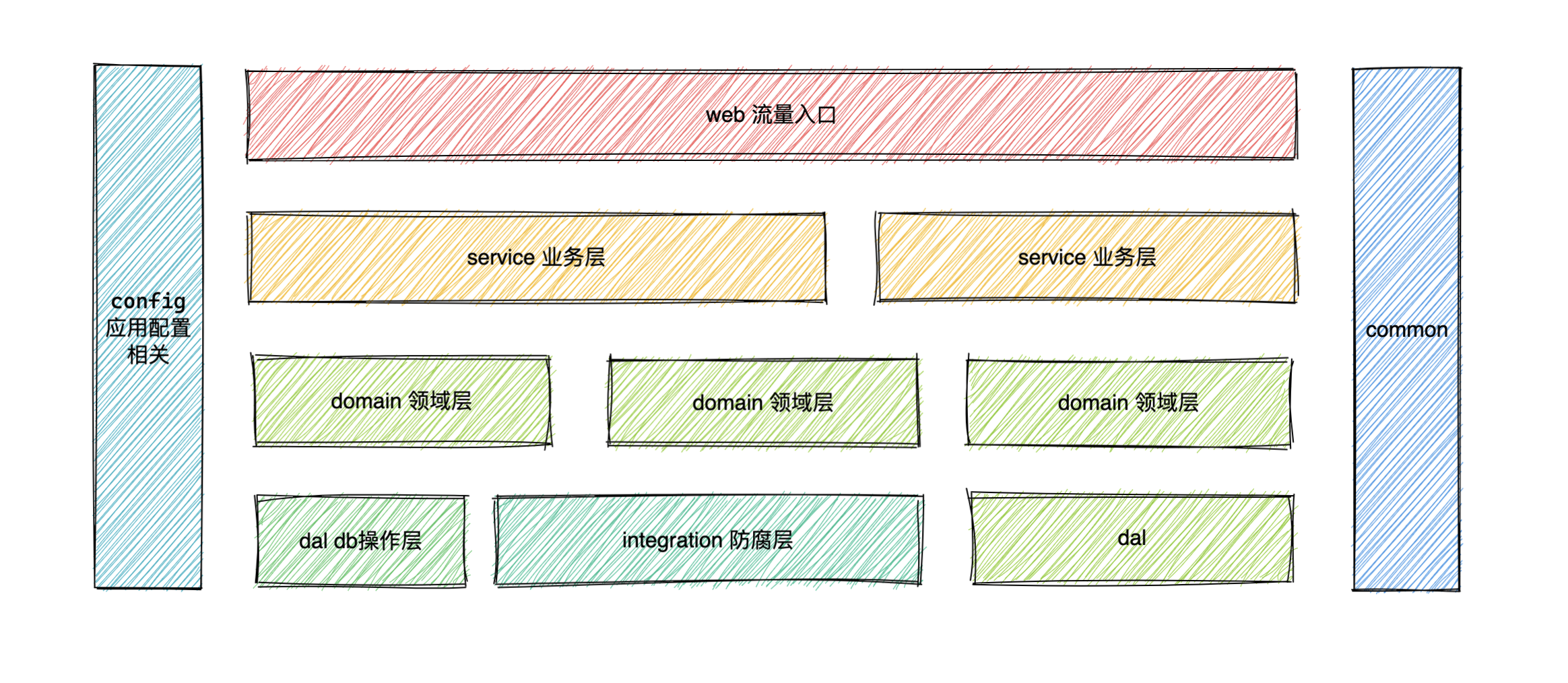
json
1{
2  "namespace":[
3    {
4      "type":"web",
5      "path":"example/example-web/src/main/java/com/github/example/web/",
6      "packagePath":"com/github/example/web"
7    },
8    {
9      "type":"service",
10      "path":"example/example-service/src/main/java/com/github/example/service/",
11      "packagePath":"com/github/example/service"
12    },
13    {
14      "type":"domain",
15      "path":"example/example-domain/src/main/java/com/github/example/domain/",
16      "packagePath":"com/github/example/domain"
17    },
18    {
19      "type":"dal",
20      "path":"example/example-dal/src/main/java/com/github/example/dal/",
21      "packagePath":"com/github/example/dal"
22    },
23    {
24      "type":"integration",
25      "path":"example/example-integration/src/main/java/com/github/example/integration/",
26      "packagePath":"com/github/example/integration"
27    },
28    {
29      "type":"config",
30      "path":"example/example-config/src/main/java/com/github/example/config/",
31      "packagePath":"com/github/example/config"
32    },
33    {
34      "type":"common",
35      "path":"example/example-common/src/main/java/com/github/example/common/",
36      "packagePath":"com/github/example/common"
37    }
38  ],
39  "config":{
40
41  },
42  "dbConfig":{
43    "host":"",
44    "user":"",
45    "password":"",
46    "database":""
47  },
48  "models":[
49    {
50      "suffix":"DO",
51      "tableName":[
52
53      ],
54      "path":""
55    }
56  ]
57}
手动添加配置文件
当你项目已经创建完成,但是想要使用的情况下, 你是可以通过配置的方式来支持的。
首先在项目的根目录创建文件 .jmvn.json
json
1{
2  "namespace": [
3  ],
4  "config": {},
5  "dbConfig": {
6    "host": "10.*.*.8",
7    "user": "root",
8    "password": "123456",
9    "database": "test"
10  },
11  "models": [
12    {
13      "suffix": "DO",
14      "tableName": [
15        "user",
16        "user_detail"
17      ],
18      "path": "example-dal/src/main/java/com/example/dal/entity"
19    }
20  ]
21}