基于命令行的Java脚手架
!!! tip jmvn
现阶段SpringBoot + Maven多模块是构建Java后台项目的标准格式,但是Maven多模块和成熟的Java项目结构搭建起来也是比较费力的。
对于一个老鸟来说可能需要5分钟,但是对于一个小白或者是非专业认识,可能需要更长的时间。
这里提供一个命令行交互式的构建工具,希望能解决这种简单重复的工作。
jmvn就是为了解决这问题诞生的, 一个快速构建Maven多模块应用的构建工具 
背景 & 目标
目标打造一个简单好用的 Java 服务脚手架工具,让任何没有开发经验的同学都能快速构建一个可以运行的项目
工具围绕几个方面进行开发, 力求在以下方面提高开发的工作效率, 同时同过脚手架的方式从一开始就统一下项目结构和模型。
- 深度定制 (定制公司标准的项目结构)
- 快速构建标准的Maven多模块服务
- 支持数据库模型快速安装 (一次配置终生使用, 多快好省)
- 数据库模型文档一键导出 (每次表结构变更, 快速导出最新表文档)
一、介绍 | Introduce
快速构建支持SpringBoot的Maven多模块应用,启动及快速打包部署
- 支持Maven多模块构建、
- 数据库模型安装、
- 数据库模型导出),
- 统一项目规范,
- 提高工作效率,
- 可进行深度定制。
二、快速安装 | Fast installation
2.1 Node环境安装
!!!: code-group
!!! code-group-item Window
1https://nodejs.org/dist/v14.15.5/node-v14.15.5-x64.msi!!!
!!! code-group-item Mac:active
1https://nodejs.org/dist/v15.9.0/node-v15.9.0.pkg!!!
!!!:
2.2 安装
1➜ npm i jmvn -g三、功能介绍
3.1 快速构建 | To quickly build
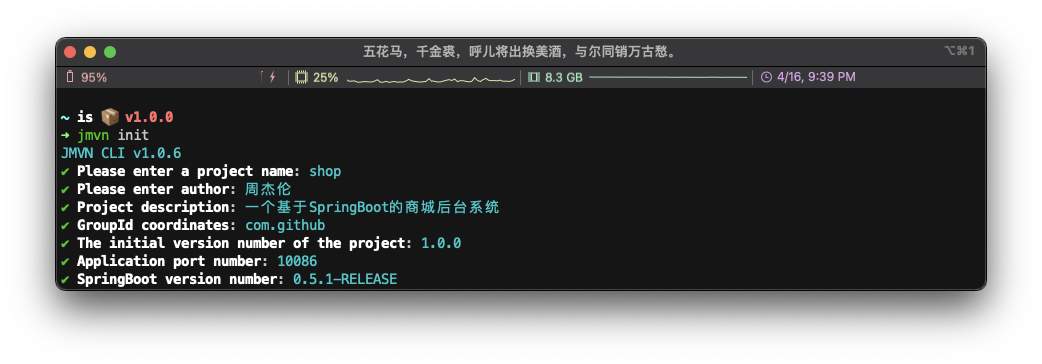
3.1.1 命令行构建项目 | Command line build
1ℹ Build:shop/shop-web/src/main/java/com/github/shop/web/
2ℹ Build:shop/shop-web/src/main/resources/
3ℹ Build:shop/shop-web/src/main/java/com/github/shop/web/
4ℹ MavenHooks webPath:shop/shop-web/src/main/java/com/github/shop/web/
5✔ Build: Add SpringBoot Config:shop/shop-web/src/main/resources/application.yml
6ℹ Build:shop/shop-service/src/main/java/com/github/shop/service/
7ℹ Build:shop/shop-service/src/main/resources/
8ℹ Build:shop/shop-service/src/main/java/com/github/shop/service/
9ℹ MavenHooks servicePath:shop/shop-service/src/main/java/com/github/shop/service/
10ℹ Build:shop/shop-domain/src/main/java/com/github/shop/domain/
11ℹ Build:shop/shop-domain/src/main/resources/
12ℹ Build:shop/shop-domain/src/main/java/com/github/shop/domain/
13ℹ MavenHooks domainPath:shop/shop-domain/src/main/java/com/github/shop/domain/
14ℹ Build:shop/shop-dal/src/main/java/com/github/shop/dal/
15ℹ Build:shop/shop-dal/src/main/resources/
16ℹ Build:shop/shop-dal/src/main/java/com/github/shop/dal/
17ℹ MavenHooks dalPath:shop/shop-dal/src/main/java/com/github/shop/dal/
18ℹ Build:shop/shop-integration/src/main/java/com/github/shop/integration/
19ℹ Build:shop/shop-integration/src/main/resources/
20ℹ Build:shop/shop-integration/src/main/java/com/github/shop/integration/
21ℹ MavenHooks integrationPath:shop/shop-integration/src/main/java/com/github/shop/integration/
22ℹ Build:shop/shop-config/src/main/java/com/github/shop/config/
23ℹ Build:shop/shop-config/src/main/resources/
24ℹ Build:shop/shop-config/src/main/java/com/github/shop/config/
25ℹ MavenHooks configPath:shop/shop-config/src/main/java/com/github/shop/config/
26ℹ Build:shop/shop-common/src/main/java/com/github/shop/common/
27ℹ Build:shop/shop-common/src/main/resources/
28ℹ Build:shop/shop-common/src/main/java/com/github/shop/common/
29ℹ MavenHooks commonPath:shop/shop-common/src/main/java/com/github/shop/common/
30✔ GitIgnore before
31   __  ____   ___  __    _______   ____
32  /  |/  / | / / |/ /___/ ___/ /  /  _/
33 / /|_/ /| |/ /    /___/ /__/ /___/ /
34/_/  /_/ |___/_/|_/    \___/____/___/  Application shop Build Success
35
36✔ 🚀 JMVN CLI v1.0.6
37┌────────┬────────┬──────────┬────────────────┬──────────────────────────────────────┬────────┐
38│ 项目名 │ 作者   │ 项目版本 │ SpringBoot版本 │ 描述                                 │ 端口号 │
39├────────┼────────┼──────────┼────────────────┼──────────────────────────────────────┼────────┤
40│ shop   │ 周杰伦 │ 1.0.0    │ 0.5.1-RELEASE  │ 一个基于SpringBoot的商城项目后台服务 │ 10086  │
41└────────┴────────┴──────────┴────────────────┴──────────────────────────────────────┴────────┘
42✔ GitIgnore invoke
43✔ GitIgnore after
3.2 安装数据库库模型 | Install the database library model
3.2.1 配置安装信息 | Configure installation information#
- 配置项目开发数据库地址
- 配置模型命名规则及安装目录
1{
2  "dbConfig": {
3    "host": "10.*.*.121",
4    "user": "o*test",
5    "password": "9G****RZ",
6    "database": "***"
7  },
8  "models": [
9    {
10      "suffix": "DO",
11      "tableName": [
12        "w_order",
13        "w_push_order"
14      ],
15      "path": "scm-dao/src/main/java/com/idanchuang/scm/dao/entity/Do"
16    }
17  ]
18}
3.2.2 执行命令 | Execute the command
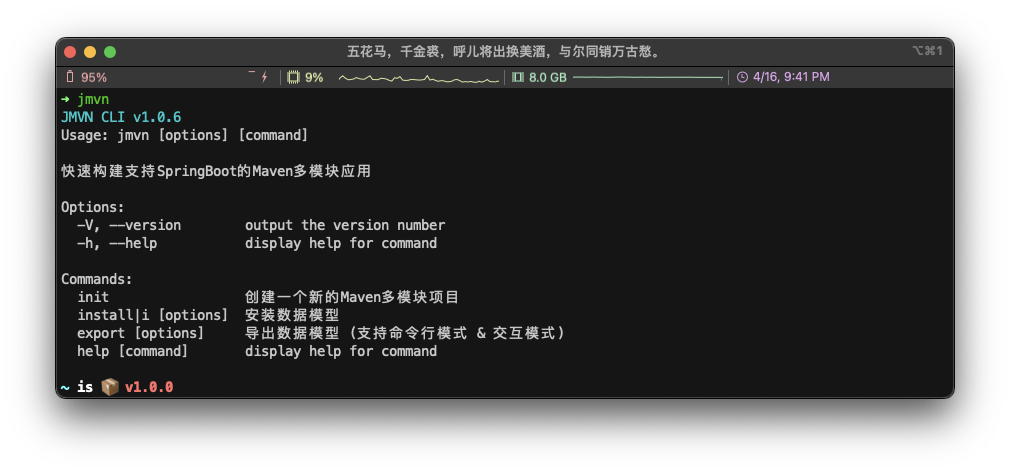
1➜ jmvn
2JMVN CLI v1.0.6
3Usage: jmvn [options] [command]
4
5快速构建支持SpringBoot的Maven多模块应用
6
7Options:
8  -V, --version        output the version number
9  -h, --help           display help for command
10
11Commands:
12  init                 创建一个新的Maven多模块项目
13  install|i [options]  安装数据模型
14  export [options]     导出数据模型 (支持命令行模式 & 交互模式)
15  help [command]       display help for command
3.3 导出数据模型文档 | Export data model documents
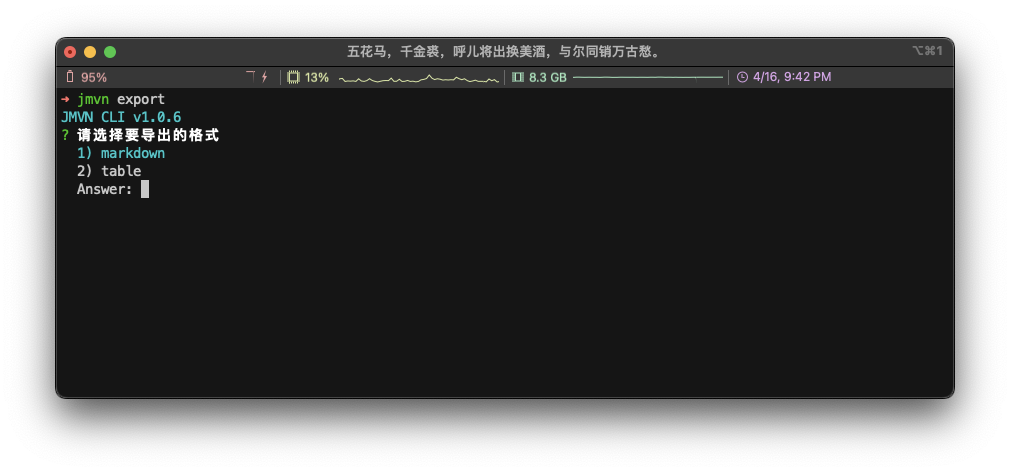
为了方便我们写技术文档, 支持直接导出成 markdown 格式文档。
四、发布记录 | Release record
1.0.1
构建服务 支持注册命令
1.0.2
代码精简及优化 版本检测及升级
1.0.3
fix端口号映射问题
1.0.4
优化版本检测,在网络差场景的用户体验
五、定制 | Custom
为了达到深度定制的能力, 你所看到的一切都是可配置的。在模块每一层创建的同时也提供了钩子方法。允许你在钩子节点去做定制开发 。 MavenHooks.js
欢迎感兴趣的小伙伴一起参与开发, 🚀 call me!
微信: lxchinesszz
邮箱: lxchinesszz@163.com
六、扩展知识 | Expand the knowledge
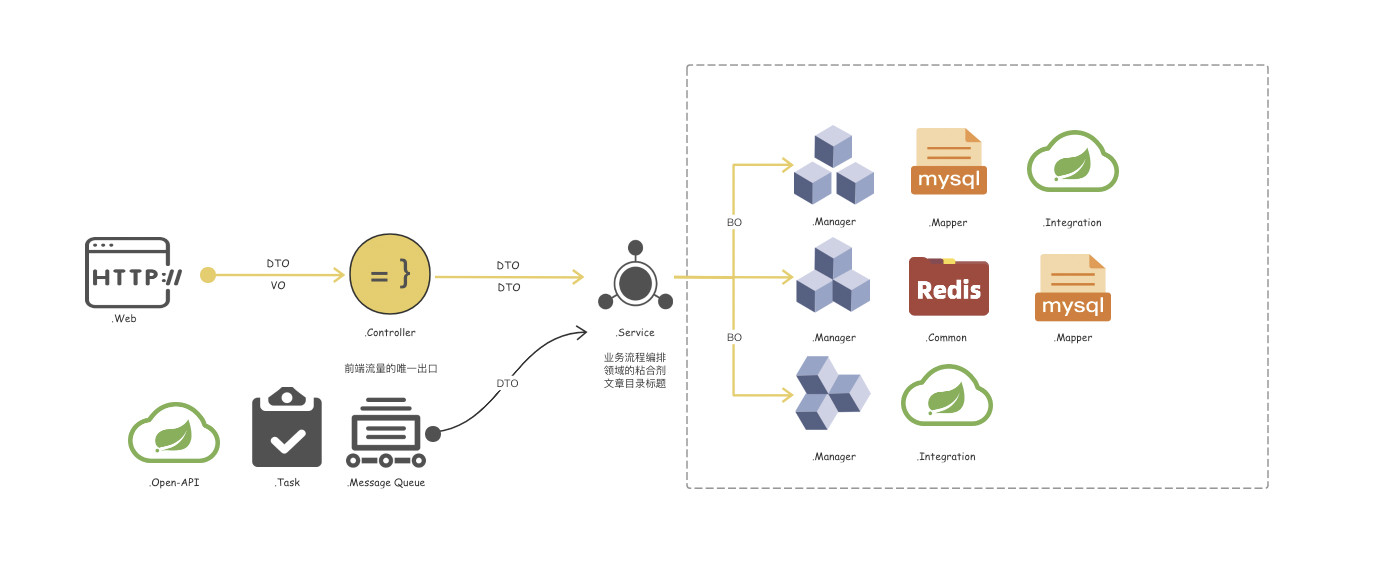
项目结构设计支持配置, 在配置前请确定你的编程方法论和价值观。以下文档仅供参考。也是当前工具所保持的价值观。
6.1 分层命名 | Hierarchical naming
 明确业务分层架构,定义领取模型, 编程不迷茫
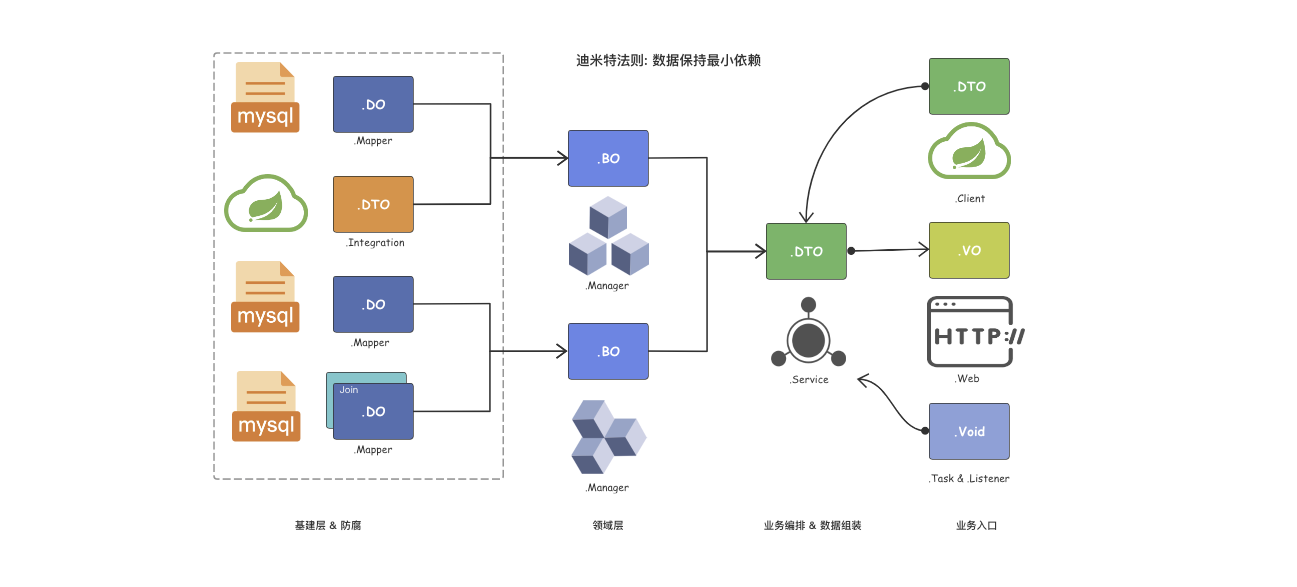
6.2 数据模型规范 | Data model specification
 迪米特法则: 不要和陌生人说话,数据模型之间保持最少的了解 迪米特法则: 不要和陌生人说话,数据模型之间保持最少的了
七、插件开发 | Plug-in development
脚手架工具会将在每个 Maven Module 创建过程中去发出不同对应的事件, 插件开发者可以不同的事件类型来开发插件。
7.1 事件类型 | The event type
| 事件类型 | 事件说明 | 环境信息 |
|---|---|---|
| BUILD_BEFORE | 构建前触发 | - |
| BUILD_WEB | 构建web层触发 | { projectConfig: Object, currentPath: '' } |
| BUILD_SERVICE | 构建service层触发 | { projectConfig: Object, currentPath: '' } |
| BUILD_DOMAIN | 构建domain层触发 | { projectConfig: Object, currentPath: '' } |
| BUILD_DAL | 构建dal层触发 | { projectConfig: Object, currentPath: '' } |
| BUILD_INTEGRATION | 构建integration层触发 | { projectConfig: Object, currentPath: '' } |
| BUILD_CONFIG | 构建config层触发 | { projectConfig: Object, currentPath: '' } |
| BUILD_COMMON | 构建common通用层触发 | { projectConfig: Object, currentPath: '' } |
| BUILD_COMPLETE | 构建完成触发 | { "namespace":Array[7], "config":Object, "dbConfig":Object, "models":Array[1], "projectConfig":Object } |
| BUILD_JAVA_RESOURCE | 构建java资源文件时候触发 | { projectConfig: Object, currentPath: '' } |
| BUILD_JAVA_WEB_RESOURCE | 构建java, Web资源文件时候触发 | { projectConfig: Object, currentPath: '' } |
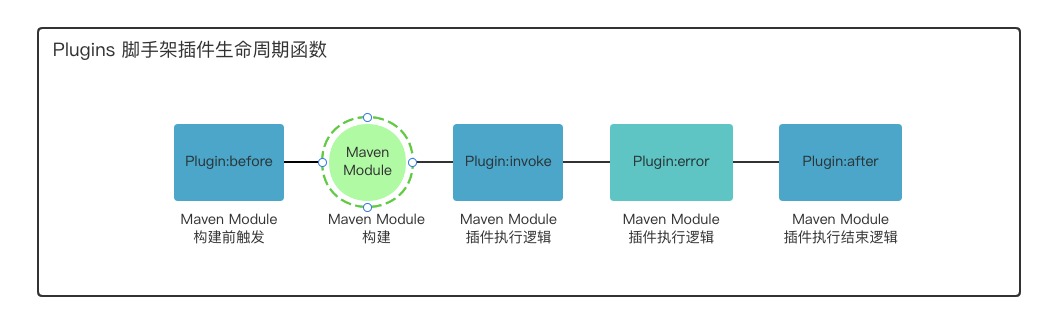
7.2 插件生命周期函数 | Life cycle function
7.3 插件开发示例 | The sample
7.3.1 创建目录 | Create a directory
plugins 目录下创建插件子目录
7.3.2 实现插件生命周期函数 | Write a function
插件支持before、invoke、error、after。插件的核心逻辑在invoke,可以直接实现该方法即可。
所有的声明周期函数都有且只有一个入参,但是不同事件入参信息是不一样的,可以参考 7.1 事件类型, 参数说明。
1// 方式1: 仅仅实现核心逻辑,不关注生命周期函数
2new Plugin('GitIgnore', 'GitIgnore创建', PluginEventType.BUILD_COMPLETE, new GitAction().createGitIgnoreFile);
3
4// 方式2: 通过方法重写方式实现,生命周期方法
5let plugin2 = new Plugin('GitIgnore', 'GitIgnore创建', PluginEventType.BUILD_COMPLETE);
6
7plugin2.before = function(envConfig){
8	console.log('插件before')
9}
10
11plugin2.after  = function(envConfig){
12	console.log('插件before')
13}
7.3.3 注册开发好的插件 | To register the plugin
plugins.Install.js 进行注册
1/**
2 * 定义插件
3 *
4 * before->invoke->success->after
5 * error异常捕捉执行
6 * @param name 插件名称
7 * @param desc 插件说明
8 * @param type 插件类型
9 * @param action 插件核心逻辑
10 * @constructor
11 */
12function Plugin(name, desc, type, action) {}
13
14// 注册一个git忽略文件插件,接受maven构建完成事件
15Plugins.register(new Plugin('GitIgnore', 'GitIgnore创建', PluginEventType.BUILD_COMPLETE, new GitAction().createGitIgnoreFile))
7.3.4 完整的参数入参 | Parameters for details
- 项目名称
tests为例
1{
2    "namespace":[
3        {
4            "type":"web",
5            "path":"tests/tests-web/src/main/java/com/idanchuang/tests/web/",
6            "packagePath":"com/idanchuang/tests/web"
7        },
8        {
9            "type":"service",
10            "path":"tests/tests-service/src/main/java/com/idanchuang/tests/service/",
11            "packagePath":"com/idanchuang/tests/service"
12        },
13        {
14            "type":"domain",
15            "path":"tests/tests-domain/src/main/java/com/idanchuang/tests/domain/",
16            "packagePath":"com/idanchuang/tests/domain"
17        },
18        {
19            "type":"dal",
20            "path":"tests/tests-dal/src/main/java/com/idanchuang/tests/dal/",
21            "packagePath":"com/idanchuang/tests/dal"
22        },
23        {
24            "type":"integration",
25            "path":"tests/tests-integration/src/main/java/com/idanchuang/tests/integration/",
26            "packagePath":"com/idanchuang/tests/integration"
27        },
28        {
29            "type":"config",
30            "path":"tests/tests-config/src/main/java/com/idanchuang/tests/config/",
31            "packagePath":"com/idanchuang/tests/config"
32        },
33        {
34            "type":"common",
35            "path":"tests/tests-common/src/main/java/com/idanchuang/tests/common/",
36            "packagePath":"com/idanchuang/tests/common"
37        }
38    ],
39    "config":{
40        "_projectName":"tests",
41        "_web":"web",
42        "_biz":"service",
43        "_domain":"domain",
44        "_dal":"dal",
45        "_integration":"integration",
46        "_config":"config",
47        "_common":"common",
48        "_groupId":"com.idanchuang",
49        "_projectVersion":"1.0.0",
50        "_projectDescription":"description",
51        "_springBootVersion":"0.5.1-RELEASE"
52    },
53    "projectConfig":{
54        "projectName":"tests",
55        "web":"web",
56        "biz":"service",
57        "domain":"domain",
58        "dal":"dal",
59        "integration":"integration",
60        "config":"config",
61        "common":"common",
62        "groupId":"com.idanchuang",
63        "projectVersion":"1.0.0",
64        "mavenSurefireJavaVersion":"1.8",
65        "projectDescription":"description",
66        "springBootVersion":"0.5.1-RELEASE",
67        "port":"8081",
68        "projectAuthor":"mvn-cli",
69        "modelFlag":true
70    }
71}
7.4 插件测试 | Plug-in Test
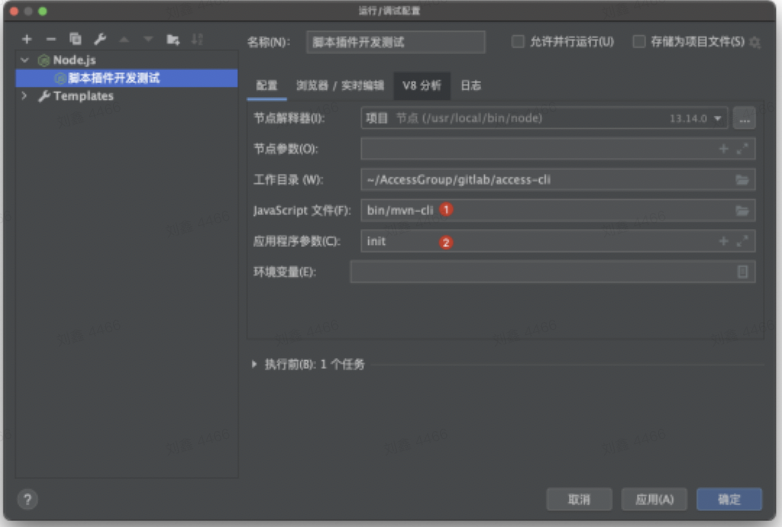
配置完成即可进行 debug