Arco Tabs + animatecss 动画
vue
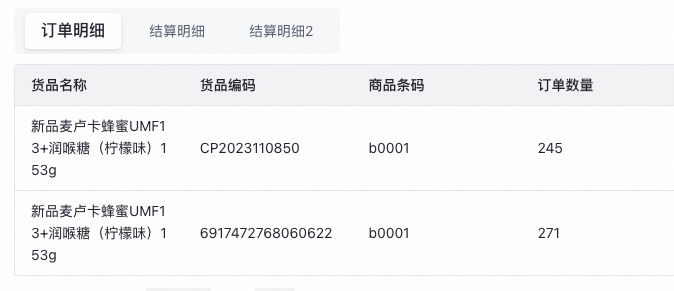
用法
text
1<Tabs :tabs="[{title: '订单明细',slot: 'details'},{title: '结算明细',slot: 'settle'},{title: '结算明细2',slot: 'settle2'}]">
2        <template #details>
3          <EditorTable :editor="editor" v-model="data.orderDetails" :columns="detailsCls"/>
4        </template>
5        <template #settle>
6          <EditorTable :editor="editor" v-model="data.orderDetails" :columns="detailsCls"/>
7        </template>
8        <template #settle2>
9        </template>
10      </Tabs>
组件
text
1<template>
2  <div class="tabsWrapper">
3    <a-card :bordered="false">
4      <a-tabs type="rounded"
5              class="custom-tabs"
6              v-model:active-key="activeKey"
7              @change="handleChange"
8      >
9        <a-tab-pane v-for="tab in props.tabs" :key="tab.slot">
10          <template #title>
11            {{ tab.title }}
12          </template>
13          <slot :name="tab.slot"/>
14        </a-tab-pane>
15      </a-tabs>
16    </a-card>
17  </div>
18</template>
19
20<script setup lang="ts">
21export interface TabTableProps {
22  title: string;
23  slot: string;
24}
25
26export interface TabsProps {
27  tabs: TabTableProps[]
28}
29
30const props = withDefaults(defineProps<TabsProps>(), {
31  tabs: []
32})
33
34// 当前激活的 key
35const activeKey = ref(props.tabs.length ? props.tabs[0].slot : "");
36
37// 上一次的 key
38const prevKey = ref(activeKey.value);
39
40// 动画方向
41const animation = ref("");
42
43const left = ['fadeInLeft', 'slideInLeft'];
44
45const right = ['fadeInRight', 'slideInRight'];
46
47/**
48 * 切换 tab 时触发
49 */
50function handleChange(newKey: string) {
51  const oldIndex = props.tabs.findIndex((t) => t.slot === prevKey.value);
52  const newIndex = props.tabs.findIndex((t) => t.slot === newKey);
53
54  if (oldIndex < newIndex) {
55    animation.value = left[1];
56  } else {
57    animation.value = right[1];
58  }
59
60  prevKey.value = newKey;
61}
62</script>
63
64<style scoped lang="scss">
65#container {
66}
67
68.tabsWrapper {
69  :deep(.arco-card-body) {
70    padding: 5px 0px !important;
71  }
72
73  :deep(.arco-tabs-nav::before) {
74    //display: none !important;;
75  }
76
77  :deep(.arco-tabs-content) {
78    padding: 5px 0;
79  }
80
81  :deep(.arco-tabs-nav-tab-list) {
82    padding: 5px;
83    background-color: var(--color-fill-1);
84    border-radius: 5px;
85
86    position: relative;
87  }
88
89  :deep(.arco-tabs-nav-type-rounded .arco-tabs-tab) {
90    border-radius: 5px;
91  }
92
93  :deep(.arco-tabs-tab:hover) {
94    background-color: var(--color-fill-1);
95  }
96
97  :deep(.arco-tabs-nav-type-rounded .arco-tabs-tab-active) {
98    background-color: var(--color-bg-2);
99    box-shadow: 0 2px 5px rgba(0, 0, 0, 0.1);
100    transition: background-color .3ms ease-in-out;
101    animation: v-bind(animation);
102    animation-duration: .3s;
103  }
104
105}
106</style>
107